Connect your Havilo account, choose a workspace, and start asking questions.
Copy this server URL:
https://havilo.ai/api/mcpConnect Claude
Custom connectors work on Free, Pro, Max, Team, and Enterprise. Free accounts can add one. On Team or Enterprise, an owner must add the connector before members connect their own accounts.
- Open Claude → Customize → Connectors.
- Select Add custom connector.
- Enter Havilo as the name and paste the server URL above.
- Select Continue and follow the sign-in prompts. Use automatic OAuth setup when offered; no client secret is needed.
- Sign in to Havilo, choose your workspace, and approve the connection.
- In a new chat, open + → Connectors and enable Havilo.
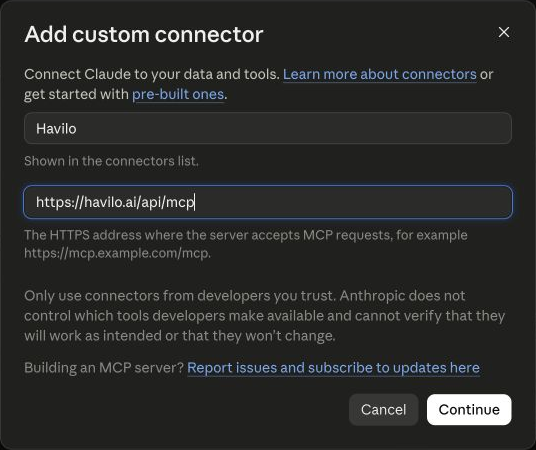
If Claude asks for a client ID instead of offering automatic setup, enter havilo-mcp-prod and leave the secret blank.
Connect ChatGPT
Use ChatGPT on the web with a Plus, Pro, Business, Enterprise, or Education account. Your workspace administrator may need to enable developer mode.
- Open Settings → Security and login and enable Developer mode.
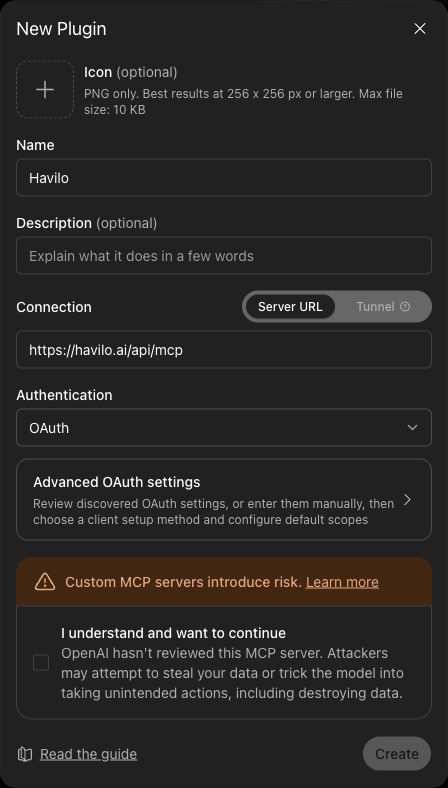
- Open Plugins and select + to create an app.
- Name it Havilo, paste the server URL, and leave Authentication set to OAuth. Keep the discovered OAuth settings.
- Review the custom-server notice, select its checkbox, and choose Create.
- Choose Sign in with Havilo, sign in, select your workspace, and approve the connection.
- Start a new chat. Open + → Developer mode and select Havilo.
Check your workspace
Ask:
Use Havilo to tell me which workspace I'm connected to and what I can do there.
The answer should name the workspace you chose. To switch, disconnect Havilo in your AI client's connector settings and reconnect with the other workspace.
Then try:
Find people in my workspace who work in climate technology.
Show the Situations waiting for my input.
Draft a follow-up to a contact I choose and give me a link to review it.
Sign in through your organization
If your workspace uses an external sign-in provider, use that option on Havilo's connection page. If it opens a new tab, sign in there, return to Havilo, and select Continue connecting.
Connect Codex
For the local mcp-remote bridge, add an MCP server of type STDIO with the command npx and these arguments:
-y
mcp-remote
https://havilo.ai/api/mcp
33418
--static-oauth-client-info
{"client_id":"havilo-mcp-prod"}
--static-oauth-client-metadata
{"scope":"mcp:workspace"}
--transport
http-only
Keep the port argument. Havilo matches redirect URLs exactly, and without it the bridge picks an unpredictable port that is not registered.
ChatGPT on the web cannot use this route, because its connectors run on OpenAI's servers and cannot launch a local bridge.
Claude setup requirements · ChatGPT developer mode requirements